Though there are various job prospects to pursue in the IT sector, automation testing is a demanding career. If you choose selenium testing tools, you have chosen the right thing. There are various tools for testing in the automation testing market, such as Testsigma, LambdaTest, Appsurify TestBrain, Telerik Test Studio, Watir, TestComplete and many more. Though these automation tools have unique features, Selenium has become integral to many businesses.
According to the survey, it is stated that there are more than 11,000+ job opportunities for the selenium automation tester. Moreover, automation testing is expected to increase USD 49.9 billion by 2026, at a CAGR of 19.3% during the forecast period."
To learn more about the selenium automation framework, you can join Selenium Training in Chennai, which will impart you with the core concepts of Selenium and software automated testing tools.
In this blog, we shall discuss types of automated testing, software automated testing tools and selenium automation framework.
What is Selenium?
The tester utilizes selenium automation tools because it is a free, open-source testing framework. Moreover, due to its flexibility, it can be integrated with different browsers and platforms for examining web applications. Furthermore, the selenium automation tester can use various programming languages like Java, Python, and C# to build Selenium Test Scripts.
So, the test executed through Selenium is referred to as Selenium Testing. Selenium is not just a tool but an application suite for numerous quality assurance testing required for an organization. Selenium testing tool includes
- Selenium Integrated Development Environment (IDE)
- Selenium Remote Control (RC)
- WebDriver
- Selenium Grid
Join Java Training In Bangalore and learn Java Basics, Constructor, Interfaces and Objects and Class.
What is the advantage of automation testing over manual testing?
While developing an application, manual testing plays a crucial role, but unfortunately, it has many shortcomings. The primary issue is that manual testing will become tedious and repetitive. So, to overcome this complexity, Jason Huggins decided to automate the process. He has developed JavaScriptTestRunner, which has the competency to automate the web-based application. This developed programme was now termed Selenium in 2004.
Though selenium has numerous pros, the main disadvantage is that it can be operated only for web applications. But, software and mobile applications may be tested using tools like Hewlett Packard's, QuickTest Professional and Appium.
So, upon completing the Selenium Training in Chennai, you will understand Selenium automation testing concepts, types of automated testing and how to automate the test script.
If you want to learn more about Selenium, you can join Selenium Online Training and learn the selenium testing tool and which tool is used for functional automation.
Selenium Automation Testing Tools
Selenium is made up of several technologies that make the testing process easier.

Selenium IDE
Shinya Kasatani developed Integrated Development Environment (IDE) in 2006. Typically, it is an easy-to-use interface because the user interactions are recorded to create automated test scripts. Conventionally, chrome plugins or Firefox are utilized as a prototyping tool. It was primarily designed to aid the rapid development of automation scripts.
In August 2017, Firefox stopped supporting Selenium IDE when it upgraded to the new Firefox 55 version. The most recent version introduced various advancements, including:
- The test script is reusable
- Able to debug the test script
- Selenium side runner
- Able to enhance the functionality of locator
- Statements about control flows are accepted.
To have an in-depth understanding of Selenium, you can join Selenium Training in Bangalore and learn more about types of automated testing like Functional Testing, Unit Testing, Integration Testing, Smoke Testing and many more. Let's now examine Selenium IDE in detail.
Installing an integrated Development Environment
Step 1- Install the Firefox web browser.
Step 2- On the top of the corner, you can click on the menu
Step 3- In the drop-down box, you can select Add-ons
Step 4- Type "Selenium IDE" into the Find more add-ons box and click.
Step 5- Choose "Add to Firefox"
After installation, the Selenium IDE logo displays in the browser's upper right corner. Once clicked, the message will appear.
Recording a Test
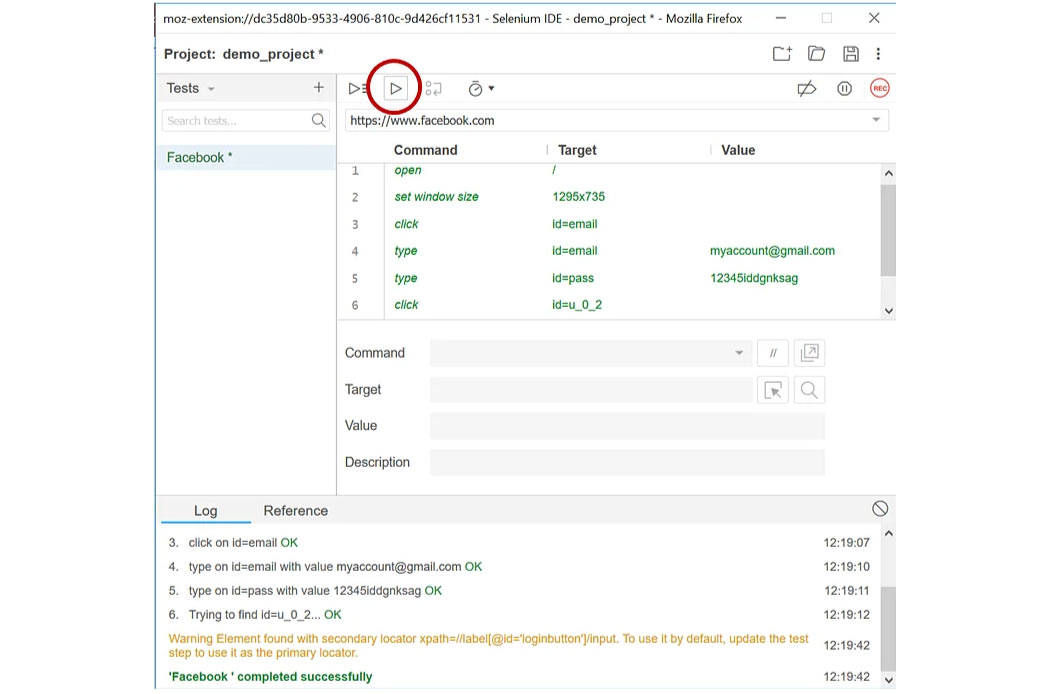
Now we shall learn how to record the test. If you intend to start a new project, you should create a test. As an initial step, name your project that is demo_project.

We need to provide a valid URL before recording. Once the browser arrives at this URL, the recording gets started.
Go to the Facebook login page now.
You will be directed to the Facebook page and can begin recording user interactions by clicking "Start Recording."
The user has the option to halt recording. Every user action is captured and turned into a script.
Save Your Work
Now, as a next step to save your recordings, you can click on the icon at the right corner of the Integrated Development Environment. You will be asked to provide the project with a name and a location to save it. A single file with the a.side extension is generated as a result.

Playback
In-browser: You can replay tests by selecting the test you wish to view again and clicking the Play button in the Selenium automation testing IDE. For cross-browser playback, you can employ the command-line runner.
Selenium Remote Control (RC)
It is the best software automated testing tool. Paul Hammant develops RC. Jason Huggins created a tool called "JavaScriptTestRunner" in 2004, which was the original name of Selenium-Core.
It was a collection of JavaScript functions that used the built-in JavaScript interpreter in the browser to decipher and carry out Selenese commands. After that, Selenium-Core is injected into the web browser.
Now, consider a JavaScript, test.js used by google.com. This program can access pages like google.com/mail or google.com/login within the google.com domain.

However, the software is unable to connect to elements in other domains. Selenium-Core and the web browser need local installation to share the same domain. Selenium RC, known as the Same Origin Policy, was created to overcome this restriction.
By acting as an HTTP proxy configured by the client, the server "tricks" the browser and assumes that Selenium Core and the web application under test have the exact origin.
As a result, Selenium RC is a Java server that offers application testing for programmes written in various programming languages, including Java, C#, Perl, PHP, Python, etc.
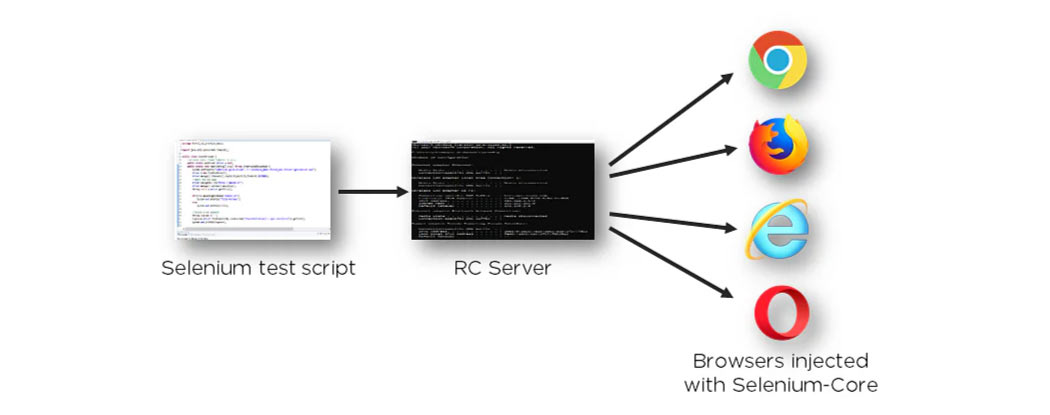
The Selenium-Core JavaScript commands are sent to the browser by the RC server after being received from the user programme.
Join PHP Training in Chennai, which will help you understand the features, Characteristics of PHP, Strings, Arrays, Conditionals and many other core concepts.
Selenium WebDriver
It is a cross-platform testing framework which Simon Stewart created in 2006. Selenium WebDriver testing framework can be set up and manage browsers on the operating system level. The programming interface used to develop and test scenarios were Selenium WebDriver.
In contrast to Selenium RC, WebDriver works directly with the browser apps and doesn't need a core engine like RC. As mentioned above, webdriver supports multiple programming languages like Perl, Python, PHP, Ruby and Java. WebDriver can also be integrated with tools like TestNG and JUnit to manage Selenium automation testing.
If you want to learn more about PHP programming language, you can join the PHP Online Course, which will help you better understand the functions and libraries of PHP.
The architecture of Selenium WebDriver is simple and easily understandable
- Selenium test script - The test code for a Selenium script is written in any of the abovementioned programming languages and is interpreted by the driver.
- JavaScript Object Notation Wire Protocol - JavaScript Object Notation Wire Protocol provides a transport mechanism to share data between a server and a client. JSON Wire Protocol serves as the industry standard for many web services.
- Browser drivers - Selenium takes advantage of drivers particular to each browser to build a secure connection with it.
- Browsers - Numerous web browsers are supported by Selenium WebDriver for testing and running apps.
If you want to learn about Java, you can join Java Training in Chennai, which will help you understand from the beginning to advanced concepts of Java.
Selenium Grid
Selenium Grid enables parallel processing by allowing test execution across several operating systems and browsers.
Grid is incredibly adaptable and integrates with other suite elements for corresponding performance.

The Grid is made up of a hub and multiple connected nodes. It is assigned the test to run along with details about the operating system and browser that will be utilized. The Grid then chooses a node that complies with the specifications (browser and platform) and approves it for use. Now, the node runs the browser and sends the Selenium commands to operate within it.
Now, we shall discuss who uses Selenium Testing Tools and How to Use Selenium With the tools.
Who Uses Selenium Testing Tools?
If you are a test engineer and developer, you might have experience working as a selenium tester. Every tester must have a basic understanding of automation testing. The only difference between them is:
- The goal they must accomplish.
- Their skills impact the tools they utilize to write test scripts.
Selenium automation framework and all the other frameworks would automate testing by test engineers. The headless browser testing won't be as pertinent to their needs.
How to Use Selenium With the Right Testing Tools
Low-code or no-code Selenium frameworks are used to implement test automation. These enable business testers to automate some of their regular tasks. Java, JavaScript, C#, Python, and other development languages can all be automated with Selenium. It is applied with no-code tools like codeless or low-code frameworks like Behavior-driven development.
If you want to become a python developer or intended to learn a python programming language, you can join Python Training in Bangalore, which will help you have a profound understanding of the features of Python, tools, libraries, and Install Python and Environment Setup.
Features of selenium testing
- Support various browsers, such as Chrome, Firefox, IE, Safari, etc.
- Support multiple programming languages like C#, Java, Python, and Ruby.
- Support various frameworks, including TestNG and JUnit.
- Jenkins, Docker, and other Continuous integration systems are simple to integrate.
- Easy production of reports
If you want to learn the python programming language, you can join Python Training in Chennai, which will help you understand Python Dictionaries, Loops and statements in Python, Python Modules & Packages and many more.
Other Tools and Frameworks
Selenium does not utilize for testing. However, it serves as the basis for numerous frameworks. Selenium also integrates with every system. You could think about combining other testing tools with Selenium in the following situations:
- Describe a testing framework (behaviour-driven development/acceptance-test-driven development) (Mocha, Jasmine, Jest, Cucumber).
- Offer assertion-related functions (Chai, Jasmine, Jest, etc.).
- Create, show, and view test results (Mocha, Karma).
- Create reports on code coverage (Istanbul, Blanket).
- Offer a browser or environment similar to a browser with control over scenario execution, UI testing, and other features (Protractor, Selenium, WebDriver.io, TestCafe).
- Give out stubs, spies, and mocks ( Jasmine, Enzyme, Jest, test double).
Availability of Frameworks
Templates and frameworks are relatively similar. Instead of making significant modifications, you can make little adjustments to the code to suit your needs for various circumstances. There are several frameworks, including:
- Data-driven testing
- Keyword driven testing
- Hybrid testing
- Module-driven testing & many more
Easy Integration With Other Tools
Selenium is simple to combine with other free software applications. Most of the technologies used in DevOps and other fields are very beneficial and open source, attracting many users. Additionally, we can achieve automation when Selenium is connected with these technologies (Continuous testing in DevOps).
Now, you would have to understand the types of automated testing, the selenium automation framework, and how Selenium is the best choice for beginners. So, to learn more about selenium automation, you can join the selenium course and learn Keyword list, String Handling, and exception Handling.